Files & photos
Lexar NM790 2TB NVMe SSD: Specifications, Performance, PS5 Compatibility, and Buying Guide
The Lexar NM790 2TB NVMe SSD is a PCIe 4.0 solid-state drive designed for desktop computers, compatible laptops, and gaming systems. With advertised sequential read speeds of up to 7,400 MB/s, sequential write speeds of up to 6,500 MB/s, and a rated endurance of 1,500 TBW, it offers specifications that make it worth considering in the high-performance PCIe 4.0 SSD category. However, maximum transfer speeds do not tell the entire story. The NM790 uses a DRAM-less architecture with Host Memory Buffer (HMB) support and dynamic SLC caching. These design choices influence how the drive performs under different workloads and on different platforms. One particularly important consideration concerns PlayStation 5 users: the PS5 does not support Host Memory Buffer. This means the NM790 cannot use its advertised HMB mechanism when installed in the console, even though Lexar markets the heatsink-equipped model as PS5-compatible. There are also differences between the standard model and the factory-heatsink version, questions about sustained-write performance, and limitations worth understanding before using the SSD in an external Mac enclosure. This guide examines the product's specifications, hardware architecture, independent benchmark results, cache behavior, PS5 compatibility, cooling requirements, endurance, and external-storage applications. It also distinguishes manufacturer specifications from independent measurements so readers can understand which numbers are official product ratings and which represent individual testing results.
 Diskfern Team14 min readUpdated
Short answer
The Lexar NM790 2TB delivers up to 7,400 MB/s reads and 6,500 MB/s writes using a DRAM-less Maxio MAP1602 controller with Host Memory Buffer (HMB 3.0) and dynamic pseudo-SLC caching. While the heatsink version physically fits the PS5, Sony's console does not support HMB, which can affect sustained performance consistency. For PC, laptop, or external Mac storage, it offers a strong 1,500 TBW endurance rating.
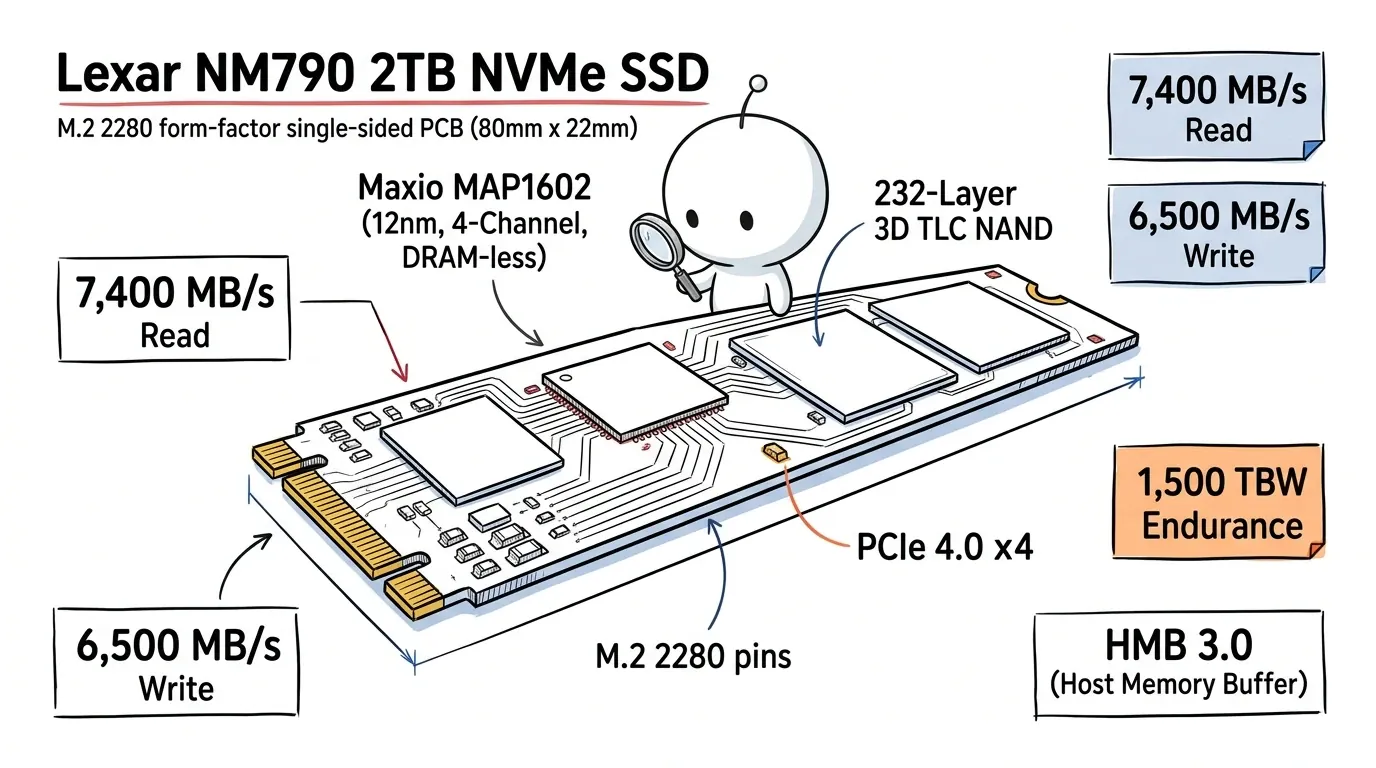
1. Lexar NM790 2TB: Complete Technical Specifications
The following specifications are taken primarily from Lexar's official product documentation. The precise protocol-version information comes from its regional product page. [S1] [S2] [S3]
| Specification | Lexar NM790 2TB |
|---|---|
| Product family | Lexar NM790 |
| Capacity | 2TB |
| Form factor | M.2 2280 |
| Interface | PCIe Gen 4.0 x4 |
| NVMe version | NVMe 1.4, according to Lexar's US product page |
| NAND technology | 3D TLC NAND |
| Dedicated DRAM | No |
| Memory management | Host Memory Buffer (HMB) 3.0 |
| Write caching | Dynamic pseudo-SLC cache |
| Sequential read | Up to 7,400 MB/s |
| Sequential write | Up to 6,500 MB/s |
| Random read | Up to 1,000,000 IOPS |
| Random write | Up to 900,000 IOPS |
| Endurance | 1,500 TBW |
| Limited warranty | Five years |
| Operating temperature | 0°C–70°C |
| Standard model dimensions | 80 × 22 × 2.45 mm |
| Heatsink model dimensions | 80 × 24 × 9.7 mm |
| Standard model layout | Single-sided |
Important specification note: Lexar's current US product documentation identifies NVMe 1.4 support for its 512GB–2TB versions and NVMe 2.0 for the 4TB version. Some older third-party review tables list NVMe 2.0 across the entire product family. For the 2TB model, the capacity-specific manufacturer's documentation is the more appropriate reference. [S1] [S5]
The advertised read and write speeds are maximum figures derived from Lexar's internal testing. They are not guaranteed results for every computer, operating system, enclosure, or workload.
What does PCIe Gen 4 x4 mean?
PCIe Gen 4 x4 describes the connection between the SSD and the host system.
The drive communicates through four PCI Express lanes using the fourth generation of the interface. This provides substantially more bandwidth than a conventional SATA SSD.
The theoretical bandwidth of PCIe 4.0 x4 is approximately 7.88 GB/s before protocol and other overhead. This helps explain why compatible drives can achieve sequential transfer speeds in the 7,000 MB/s range.
What does M.2 2280 mean?
M.2 describes the physical connector and module format, while 2280 identifies the dimensions.
- 22 mm wide.
- 80 mm long.
The M.2 2280 format is commonly used for internal SSDs in desktop computers and laptops.
However, the fact that a computer contains an M.2 slot does not automatically mean it supports the NM790.
The slot must support PCIe NVMe storage and the appropriate physical configuration.
What does NVMe mean?
NVMe stands for Non-Volatile Memory Express. It is a storage communication protocol designed for high-speed SSDs connected over PCIe.
It is different from SATA, which uses a different storage interface and communication architecture.
Before purchasing, check whether your motherboard or laptop supports M.2 PCIe NVMe rather than M.2 SATA.
Official proof: S1 – Lexar NM790 product specifications.
Read more: Lexar: NM790 M.2 2280 PCIe Gen 4x4 NVMe SSD product page · Lexar: NM790 product datasheet (PDF) · Lexar: NM790 with Heatsink setup sheet (PDF)
2. Hardware Architecture: How Does the NM790 Work Without Dedicated DRAM?
One of the most interesting aspects of the Lexar NM790 is its DRAM-less architecture. Traditional high-performance SSDs often include a dedicated DRAM chip. This memory stores frequently accessed Flash Translation Layer (FTL) information, helping the SSD controller locate data stored in NAND flash. The NM790 takes a different approach. It does not include dedicated onboard DRAM. Instead, it uses Host Memory Buffer technology to access a small allocation of the host computer's system memory for selected mapping information. This helps reduce the number of components on the SSD and is part of the architecture Lexar uses to achieve its performance and power-efficiency targets.
2.1 Understanding Host Memory Buffer (HMB)
Host Memory Buffer allows a DRAM-less NVMe SSD to use a portion of the computer's system RAM for selected internal storage-management information.
To understand why this matters, consider how an SSD locates data.
An SSD needs to translate logical addresses provided by the operating system into physical locations within its NAND flash.
This translation is managed through the Flash Translation Layer.
In a conventional DRAM-equipped SSD, a dedicated memory chip stores frequently accessed mapping information.
In an HMB-based SSD, the controller can request a small amount of host memory for this purpose, provided the host platform supports the necessary functionality.
The NM790 advertises HMB 3.0 as one of its primary features. [S2]
The practical advantages include:
- No dedicated DRAM chip is required on the SSD.
- The design can reduce component costs.
- The drive can use supported host memory for mapping information.
- Its power consumption characteristics can differ from those of some DRAM-equipped alternatives.
However, HMB is not identical to dedicated onboard DRAM.
The drive depends on the host platform supporting the feature, and its behavior can change when installed in systems that do not provide HMB.
This distinction becomes especially important with the PlayStation 5.
2.2 Which controller does the Lexar NM790 use?
Independent hardware analysis of NM790 samples has identified the Maxio MAP1602 controller.
The MAP1602 is a DRAM-less controller manufactured using a 12nm process and featuring a four-channel NAND architecture.
Its design supports high NAND interface speeds, allowing the NM790 to deliver sequential performance associated with higher-end PCIe 4.0 SSDs.
Independent reviews by Tom's Hardware and NikkTech have identified the controller in their tested samples. [S5] [S6]
However, there is an important distinction:
Lexar's standard public product specification does not guarantee that every retail unit will contain a specific controller revision.
Therefore, the Maxio MAP1602 should be treated as a controller identified in independent hardware examinations, not as an independently confirmed component guarantee for every production batch.
2.3 Understanding TLC NAND flash
The NM790 uses 3D TLC NAND flash in independently examined samples.
TLC means Triple-Level Cell. Each individual memory cell stores three bits of information.
TLC offers a balance between:
- Storage density.
- Performance.
- Endurance.
- Manufacturing cost.
It is particularly relevant when comparing consumer SSDs that use TLC and QLC memory.
TLC generally provides more favorable write-endurance and sustained-write characteristics than comparable QLC designs, although the actual outcome depends on the controller, NAND generation, firmware, and workload.
Independent examinations of NM790 samples have identified 232-layer YMTC TLC flash. [S5] [S6]
However, Lexar does not publicly guarantee a specific NAND manufacturer or layer count in its standard 2TB product specification.
Some discussions also claim that alternative NAND suppliers have appeared in later production batches. I could not establish a sufficiently strong public manufacturer confirmation for those claims.
For that reason, this guide does not present a Micron B58R production variant as an established specification.
What buyers can reliably take from this: the drive's advertised product specifications should be the primary purchasing reference. A teardown of one particular unit should not automatically be generalized to every retail unit.
2.4 Why a DRAM-less SSD can still achieve high performance
A common misconception is that an SSD without dedicated DRAM must necessarily be slow.
That is not correct.
SSD performance depends on several components working together:
- The controller's processing capabilities.
- NAND flash speed and architecture.
- The PCIe interface.
- Memory-management mechanisms such as HMB.
- Firmware and cache management.
The NM790 combines a PCIe Gen 4 x4 interface, TLC NAND, HMB, and dynamic SLC caching.
This combination helps explain how it reaches its advertised sequential transfer speeds without a dedicated DRAM chip.
Nevertheless, dedicated DRAM and HMB-based designs can behave differently under demanding random-access and sustained workloads.
Technical references: S2 – Lexar official NM790 datasheet S5 – Tom's Hardware: Lexar NM790 SSD Review S6 – NikkTech: Lexar NM790 2TB Review
Read more: Tom's Hardware: Lexar NM790 SSD Review · NikkTech: Lexar NM790 2TB M.2 NVMe SSD Review
3. Real-World Performance: Understanding 7,400 MB/s
Lexar advertises sequential read speeds of up to 7,400 MB/s and sequential write speeds of up to 6,500 MB/s for the 2TB model. These specifications make the NM790 a fast PCIe 4.0 SSD on paper. However, it is important to understand what these figures measure.
3.1 Sequential read performance
Sequential read speed measures how quickly the SSD can retrieve large blocks of data stored in a continuous sequence.
This is useful for:
- Copying large files from the SSD.
- Reading video files.
- Loading large datasets.
- Opening large project assets.
- Reading game files.
- Moving virtual-machine images.
A maximum sequential read speed of 7,400 MB/s is particularly relevant when the host system can provide sufficient PCIe bandwidth.
However, application launch times and operating-system responsiveness do not necessarily improve in direct proportion to sequential read speed.
Many everyday workloads involve small, random storage operations rather than continuous large-file transfers.
This is why independent benchmark results should include more than one type of test.
3.2 Sequential write performance
Sequential write speed measures how quickly the SSD can record large amounts of data.
It matters when:
- Copying large files onto the SSD.
- Exporting substantial media projects.
- Installing large software packages.
- Downloading and installing games.
- Creating backups.
- Moving development environments.
Lexar advertises up to 6,500 MB/s sequential write performance.
However, that number does not mean the SSD will continuously maintain 6,500 MB/s during an uninterrupted multi-terabyte transfer.
The NM790 uses dynamic SLC caching, which influences its write behavior.
3.3 Independent benchmark results for the 2TB model
The FPS Review tested the heatsink-equipped Lexar NM790 2TB, identifying the tested model as LNM790X002T-RN9NU.
In its CrystalDiskMark SEQ1M Q8T1 test, it recorded:
| Benchmark | Read | Write |
|---|---|---|
| CrystalDiskMark SEQ1M Q8T1 | 7,449 MB/s | 6,642 MB/s |
| Lexar's rated maximum | 7,400 MB/s | 6,500 MB/s |
These are results from one independent test configuration, not guaranteed performance for every NM790 installation.
The test used the CrystalDiskMark NVMe profile and specifically identified its queue and thread configuration. [S8]
The purpose of including this result is to demonstrate that real benchmark results depend on testing conditions. Small differences above or below manufacturer-rated figures do not establish universal performance.
Independent test: S8 – The FPS Review: Lexar NM790 with Heatsink 2TB.
Read more: The FPS Review: Lexar NM790 with Heatsink 2TB Review
4. Dynamic SLC Cache: What Happens During Large File Transfers?
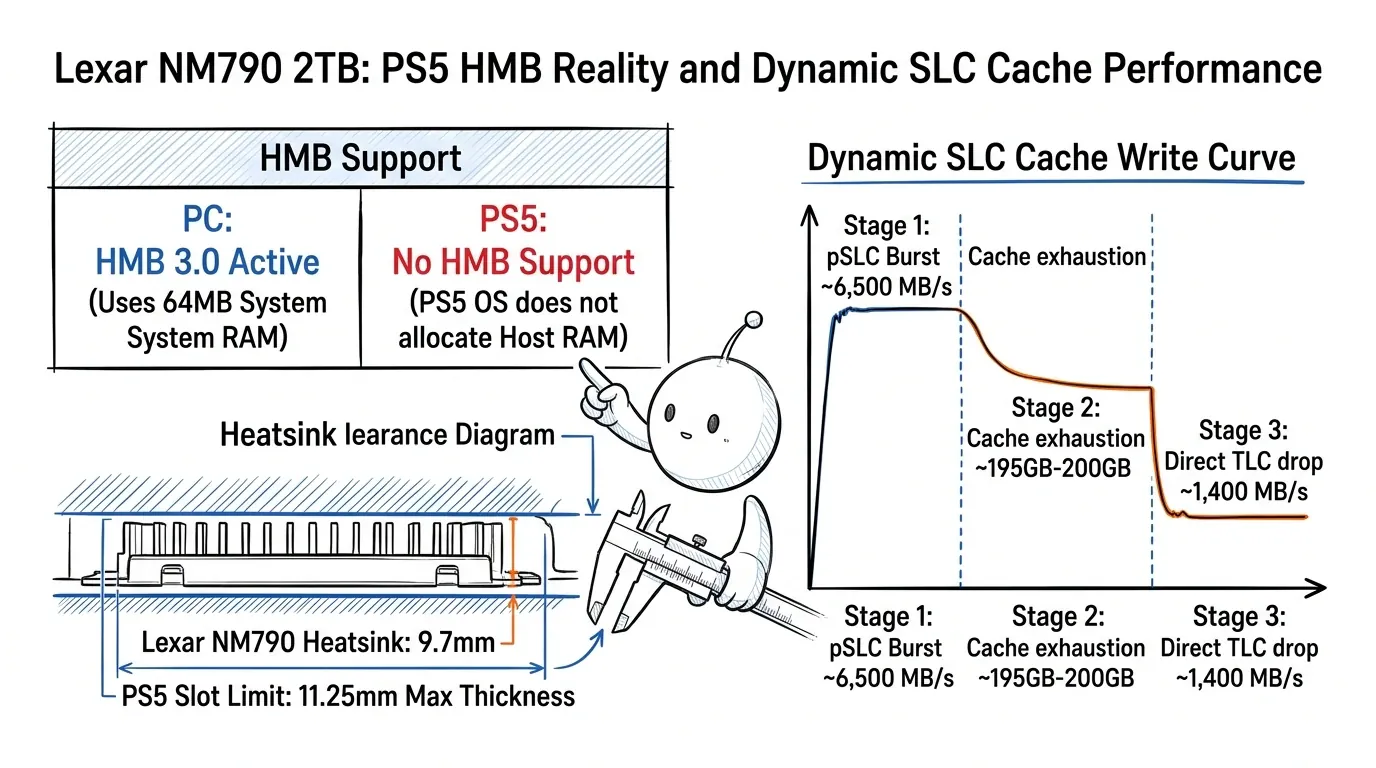
The NM790 uses dynamic pseudo-SLC caching. This is one of the most important characteristics to understand before choosing the SSD for large continuous write operations. Although the primary NAND uses TLC technology, the controller can temporarily operate part of the available flash in a single-bit-per-cell mode. This creates a faster writing area. In simple terms, the SSD temporarily uses a portion of its TLC flash as pseudo-SLC storage.
4.1 How dynamic SLC caching works
The general process looks like this:
Stage 1: Fast initial writes
Incoming data is written to the pseudo-SLC cache. During this stage, the SSD can deliver high burst write speeds.
Stage 2: Cache consumption
As the available pseudo-SLC area fills, the drive has less fast cache space available.
Stage 3: Direct-to-TLC writing
Once the cache is exhausted for the current workload, additional incoming data must be handled through the native TLC storage path. This can produce lower write speeds than the initial burst.
Stage 4: Cache management and recovery
The controller reorganizes previously cached data and performs internal storage-management operations. The amount of available cache can depend on how much space is occupied and how much idle time the drive has had.
4.2 How much SLC cache does the NM790 2TB have?
Lexar describes the NM790 as using dynamic SLC caching but does not publish a fixed 2TB cache-capacity guarantee in its standard product datasheet. [S2]
An independent SSD-Taster examination of the 2TB model, identified as LNM790X002T-RNNNG, reported an approximate cache capacity of 195GB.
In its HD Tune Pro long-term test, the reviewer wrote a 300GB test file and observed the cache filling after approximately 195GB, followed by reduced write performance. The test was performed on August 28, 2023. [S9]
This is a measurement from one specific test, not a universal specification.
The cache behavior can change depending on:
- How much storage is already occupied.
- Whether the SSD is nearly empty.
- The size of the incoming transfer.
- Previous write activity.
- The amount of idle time available.
- Firmware and testing methodology.
A frequently repeated 560GB cache figure should therefore not be presented as a guaranteed characteristic of every NM790 2TB retail unit.
The available evidence supports explaining dynamic cache behavior, not publishing a fixed number as a manufacturer's specification.
4.3 What happens after the SLC cache fills?
When the fast cache is no longer available for the incoming workload, write performance can decline.
This matters most during:
- Large continuous file transfers.
- Writing hundreds of gigabytes at once.
- Moving large virtual-machine images.
- Creating extensive video exports.
- Migrating large datasets.
- Writing substantial backups to an already occupied drive.
It does not mean that the NM790 will constantly operate at reduced speeds during everyday computer usage.
Most ordinary activities involve shorter or interrupted write operations.
The cache can therefore provide a substantial practical benefit for many consumer workloads.
4.4 Is the NM790 suitable for sustained large-file writing?
It can be suitable, but the workload matters.
For occasional large transfers and normal desktop use, its combination of fast burst writes and TLC NAND can be attractive.
For extremely large, uninterrupted workloads, compare independent sustained-write tests rather than relying only on the 6,500 MB/s headline specification.
Also remember that the 2TB and 4TB versions should not automatically be assumed to have identical cache behavior.
A test of one capacity should not be treated as a definitive measurement of every capacity.
Evidence: S2 – Lexar: Dynamic SLC caching S9 – SSD-Taster: Exact NM790 2TB cache test S5 – Tom's Hardware: Sustained-write methodology and NM790 performance
Read more: SSD-Tester: Lexar NM790 2TB Benchmark Report
5. Lexar NM790 2TB and PlayStation 5 Compatibility
The PS5 is an important use case for the NM790 because Lexar specifically markets the heatsink-equipped version as compatible with the console. However, PS5 compatibility involves more than checking the sequential read-speed rating. Two separate considerations matter: Sony's physical and interface requirements. The NM790's DRAM-less HMB architecture.
5.1 Official PS5 M.2 SSD requirements
Sony's official installation documentation specifies the following requirements for an internal M.2 expansion SSD:
| Requirement | Sony specification |
|---|---|
| Interface | PCIe Gen4 x4 NVMe SSD |
| Socket | M.2 Key M |
| Storage capacity | 250GB–8TB |
| Supported form factors | 2230, 2242, 2260, 2280, 22110 |
| Recommended sequential read | 5,500 MB/s or faster |
| Maximum width | 25 mm |
| Maximum length for 2280 | 80 mm |
| Maximum total thickness | 11.25 mm |
| Maximum thickness above the board | 8.0 mm |
| Maximum thickness below the board | 2.45 mm |
Sony also requires an effective heat-dissipation structure, such as a suitable heatsink and thermal transfer sheet.
These are Sony's published requirements, not recommendations invented by a retailer or reviewer. [S4]
Official documentation: https://www.playstation.com/en-us/support/hardware/ps5-install-m2-ssd/
5.2 Does the NM790 2TB meet the basic PS5 requirements?
The NM790 2TB has:
- PCIe Gen4 x4 connectivity.
- A 2TB capacity.
- An M.2 2280 form factor.
- Advertised sequential reads up to 7,400 MB/s.
Its advertised read speed exceeds Sony's recommended 5,500 MB/s threshold.
Lexar also specifically lists the NM790 with Heatsink as PS5-compatible. [S3]
On the basis of the published interface, capacity, and product documentation, the heatsink-equipped version is intended for this application.
However, the next point is especially important.
5.3 The PS5 does not support Host Memory Buffer
The PlayStation 5 does not allocate Host Memory Buffer memory to M.2 SSDs.
Sony explicitly confirms this in its official FAQ: "Do PS5 consoles support Host Memory Buffer?" Its answer is no.
Sony also warns that some HMB-dependent SSDs may experience slower-than-expected performance because the console does not support the feature. [S4]
This has a direct impact on how the NM790 should be evaluated.
The NM790 is a DRAM-less SSD that relies on HMB as part of its memory-management architecture.
On a compatible PC, HMB can provide access to host system memory.
The PS5 does not provide that functionality.
Therefore, the NM790 cannot use its advertised HMB mechanism in the PS5.
This does not automatically mean the SSD will fail to operate. It means that its behavior on the console should not be assumed to match its behavior on an HMB-capable PC.
5.4 Can the lack of HMB affect PS5 gaming performance?
It can affect performance consistency.
TechRadar's independent testing of the NM790 with Heatsink reported good general performance, but also observed occasional hitches in certain demanding games.
The reviewer mentioned Assassin's Creed Valhalla and Marvel's Spider-Man 2 as examples.
The review also reported strong game-copy performance and a PS5 internal storage benchmark result of 6,526 MB/s for the tested unit. [S7]
These observations are useful because they demonstrate that strong benchmark results do not necessarily tell the complete story of real-world gaming behavior.
However, they should not be interpreted as proof that every NM790 2TB user will experience stuttering.
The tested unit, game versions, console conditions, firmware, and individual workload matter.
5.5 Is the NM790 2TB worth buying for PS5?
It depends on your priorities.
The NM790 with Heatsink is worth considering when you want a 2TB PCIe 4.0 expansion drive and understand the HMB limitation.
However, if maximum performance consistency is your primary objective, compare it with SSDs that have dedicated onboard DRAM and independent PS5-specific testing.
Do not make the decision using sequential read speed alone.
A drive rated at 7,400 MB/s does not automatically provide a better real-world console experience than every other SSD with a lower advertised specification.
Most important sources: S3 – Lexar NM790 with Heatsink official documentation S4 – Sony official PS5 installation and HMB requirements S7 – TechRadar independent PS5 testing
Read more: Sony Support: PS5 M.2 SSD Installation and Requirements · TechRadar: Lexar NM790 with Heatsink Review
6. Lexar NM790 Without Heatsink vs. With Heatsink
Lexar offers standard and heatsink-equipped versions of the NM790. Both are designed around the same product family and PCIe Gen 4 interface, but their physical dimensions differ significantly. The correct version depends on the computer or console where you plan to install the SSD.
6.1 Standard NM790
The standard 2TB NM790 has these dimensions:
| Measurement | Dimension |
|---|---|
| Length | 80 mm |
| Width | 22 mm |
| Height | 2.45 mm |
| Weight | 6 g |
It is a thin M.2 module with a single-sided component layout.
This version is useful for desktop motherboards that already include an M.2 heatsink.
It can also be more convenient in laptops where the available space does not accommodate a large factory heatsink.
However, cooling requirements still depend on the host system.
6.2 NM790 with factory heatsink
The heatsink-equipped version has these dimensions:
| Measurement | Dimension |
|---|---|
| Length | 80 mm |
| Width | 24 mm |
| Height | 9.7 mm |
| Weight | Approximately 48.6 g |
It includes an integrated cooling structure.
Lexar markets this version for compatible desktop computers and PS5 installations. [S3]
For PS5 users, the factory-heatsink model is generally the more convenient option because it does not require sourcing a separate cooling assembly.
For desktop motherboards, check whether the built-in motherboard M.2 cover conflicts with the SSD's integrated heatsink.
Do not assume that both can be installed together.
6.3 Which version should you choose?
| Intended use | Suggested version |
|---|---|
| Desktop motherboard with its own M.2 heatsink | Standard NM790 |
| Desktop motherboard without an M.2 heatsink | Standard NM790 with a compatible cooling solution, or suitable factory-heatsink model |
| Laptop with limited M.2 clearance | Standard NM790 |
| PS5 expansion | NM790 with Heatsink, after checking Sony's dimensions |
| External NVMe enclosure | Standard NM790, if the enclosure supports its dimensions |
6.4 Understanding the PS5 heatsink dimensions
Sony specifies a maximum total thickness of 11.25 mm for an M.2 drive with its cooling structure.
The manufacturer's published overall dimensions for the NM790 with Heatsink are 80 × 24 × 9.7 mm.
Those overall dimensions fall within Sony's maximum length, width, and total-thickness figures.
However, Sony also specifies separate limits for the thickness above and below the SSD circuit board.
Consequently, do not rely only on total height. Check the actual assembly and follow the supplied installation instructions.
Never force the heatsink into the PS5 expansion compartment.
6.5 Product codes and regional differences
Lexar's official 2023 heatsink setup sheet identifies these 2TB part numbers: Global version: LNM790X002T-RN9NG North American version: LNM790X002T-RN9NU
Regional listings and later retail revisions may use different product codes.
Always verify the exact part number shown on the packaging and the corresponding regional Lexar product page. [S3]
Official evidence: S3 – Lexar NM790 with Heatsink Setup Sheet.
Read more: Lexar: NM790 with Heatsink Setup Sheet
7. Desktop and Laptop Compatibility
The NM790 uses the M.2 2280 format, which makes it suitable for many modern computers. Nevertheless, the availability of an M.2 connector does not establish full compatibility.
7.1 Desktop computer compatibility
Before purchasing, confirm that your motherboard has:
- An available M.2 Key M slot.
- PCIe NVMe SSD support.
- Support for an 80 mm M.2 module.
- An appropriate PCIe lane configuration.
- Sufficient space for the selected heatsink.
Also check whether the M.2 slot shares PCIe lanes with other expansion slots or storage connectors.
Motherboard manuals generally document these restrictions.
7.2 Can the NM790 work in a PCIe 3.0 motherboard?
Yes, provided the motherboard has a compatible M.2 PCIe NVMe slot.
PCIe is backward-compatible.
When connected through PCIe 3.0 x4, the NM790 negotiates the lower-generation connection and operates within its available bandwidth.
It will not achieve its advertised PCIe 4.0 maximum sequential speeds in that configuration.
The same consideration applies to systems with fewer available PCIe lanes.
7.3 Laptop compatibility
Lexar's documentation identifies the standard 1TB–4TB NM790 modules as single-sided.
This can be helpful for laptops with restricted M.2 clearance.
A single-sided SSD has its components on one side of the PCB, leaving the reverse side relatively flat.
However, single-sided construction does not guarantee compatibility with every laptop.
Before purchasing, check:
- Whether the laptop supports M.2 NVMe.
- Whether it accepts the 2280 length.
- Whether the available slot supports the appropriate PCIe generation.
- Whether the physical clearance accommodates the SSD.
- Whether the manufacturer permits user-replaceable storage.
A laptop's service manual is the most appropriate reference for its hardware restrictions.
7.4 Does the NM790 need additional cooling in a PC?
Lexar specifies an operating temperature range of 0°C–70°C.
Actual operating temperature depends on:
- Ambient temperature.
- Case airflow.
- SSD workload.
- Motherboard heatsink design.
- Thermal-pad contact.
- Installation position.
For regular gaming and ordinary desktop use, the cooling arrangement supplied by the motherboard may be sufficient.
For prolonged writes or other demanding workloads, an appropriate M.2 heatsink is worth considering.
Do not assume that the SSD can maintain its maximum advertised write speed continuously simply because the system detects it correctly.
Sources: S1 – Lexar standard NM790 specifications S2 – Lexar official datasheet S5 – Tom's Hardware independent hardware analysis
Read more: Lexar: NM790 product specifications
8. Using the Lexar NM790 2TB as External Storage on a Mac
The Lexar NM790 can also be used as external storage with a Mac. However, it is an internal M.2 NVMe module, not a portable USB SSD. To connect it to a MacBook, Mac mini, or another compatible Mac, you need a suitable external NVMe enclosure.
8.1 What kind of enclosure do you need?
The enclosure should support:
- M.2 2280 physical dimensions.
- PCIe NVMe storage.
- M-Key compatibility.
- Appropriate power delivery.
- Sufficient thermal management.
- A suitable USB, USB4, or Thunderbolt interface.
A SATA-only M.2 enclosure is not compatible with the NM790.
Check the enclosure's technical documentation before purchasing.
8.2 USB-C, USB4, and Thunderbolt performance
The NM790 can achieve up to 7,400 MB/s sequential reads when connected through a compatible PCIe Gen 4 x4 interface.
That does not mean you can achieve the same speeds through an external USB enclosure.
The external connection introduces a separate bandwidth limitation.
| Connection | Theoretical link rate | Practical consideration |
|---|---|---|
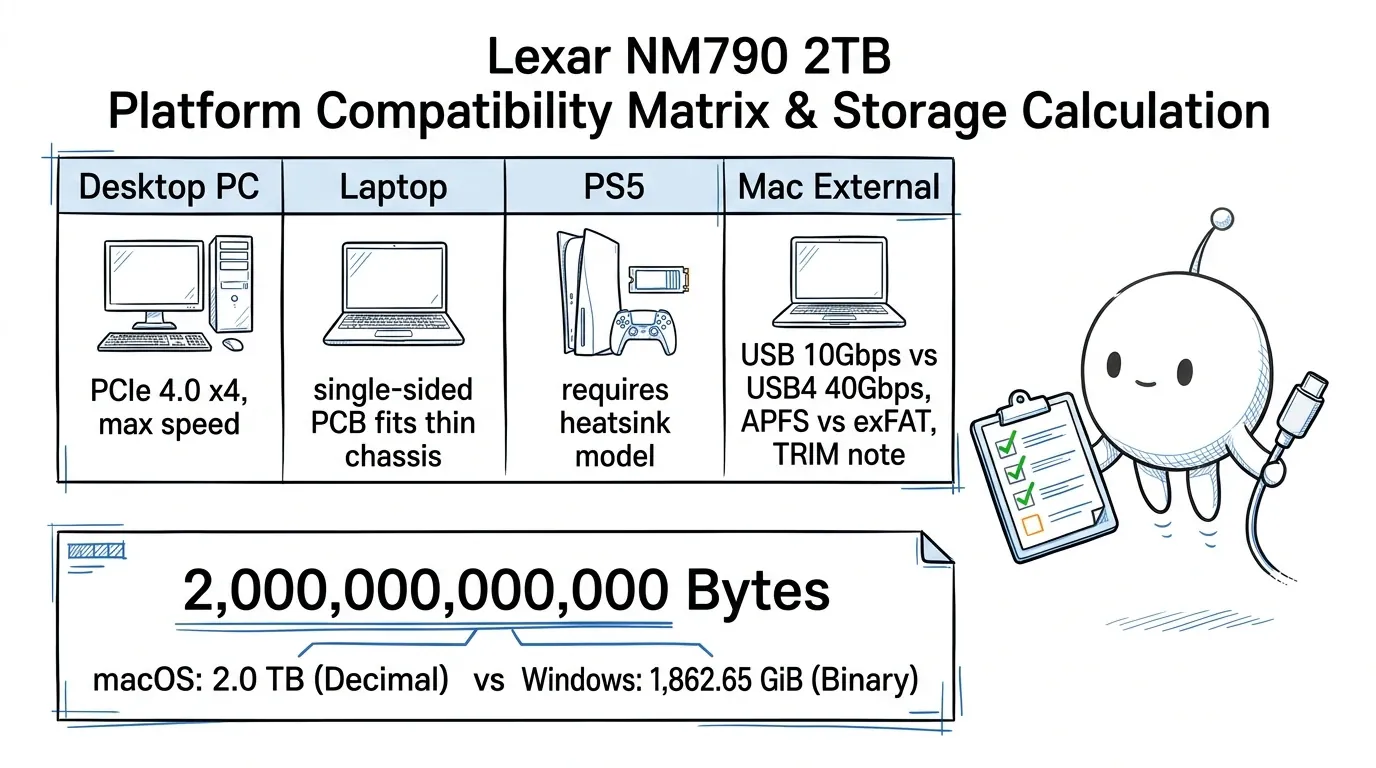
| USB 10Gbps | 1.25 GB/s | Significantly limits the SSD's internal performance |
| USB 20Gbps | 2.5 GB/s | Offers more bandwidth, subject to enclosure and host limitations |
| USB4 40Gbps | 5 GB/s | Can deliver substantially higher external transfer speeds |
| Thunderbolt 3/4 40Gbps | 5 GB/s | High-speed connectivity, subject to PCIe tunneling and hardware limitations |
These are theoretical bit-rate conversions, not guaranteed file-transfer speeds. Actual results are lower because of protocol overhead and other system limitations.
The final speed depends on the enclosure's controller, cable, Mac hardware, thermal behavior, and workload.
A USB4 enclosure will not automatically achieve the same performance as a direct PCIe 4.0 x4 connection.
8.3 Which filesystem should you use?
Once the SSD is connected, use macOS Disk Utility to initialize and format it.
The appropriate filesystem depends on how you intend to use the drive.
| Filesystem | Recommended use |
|---|---|
| APFS | Mac-only storage |
| APFS (Encrypted) | Mac-only storage with filesystem encryption |
| exFAT | Sharing files between macOS and Windows |
Apple's documentation explains that APFS is the default filesystem for modern macOS systems and supports features including encryption, snapshots, and space sharing.
exFAT is an option for storage that needs to be used between Windows and Mac computers. [S10]
Official reference: https://support.apple.com/guide/disk-utility/file-system-formats-dsku19ed921c/mac
Important: Formatting or erasing a disk removes existing data. Back up important files before initializing the NM790.
8.4 Does macOS support TRIM on an external NM790?
TRIM is a storage-management command that informs an SSD which previously used blocks no longer contain data that needs to be preserved.
This helps the SSD manage NAND flash more efficiently.
However, external TRIM support depends on the operating system, filesystem, enclosure, bridge controller, and firmware.
It is not correct to assume that every USB-C NVMe enclosure automatically passes TRIM to an external SSD.
Plugable's documentation explains that its USB NVMe enclosure has mixed TRIM results on Apple systems. Although macOS provides the trimforce facility for third-party SSDs, the manufacturer reports that support depends on the connection and operating-system environment and does not officially support TRIM on Apple hosts for that enclosure. [S11]
The correct approach is to:
- Check the enclosure manufacturer's macOS compatibility documentation.
- Verify that the exact enclosure supports the required TRIM commands.
- Check the behavior on your particular macOS version.
- Avoid assuming that USB-C, USB4, and Thunderbolt enclosures have identical storage-management behavior.
Source: S11 – Plugable: Does the USBC-NVME Support TRIM?.
Read more: Apple Support: File system formats available in Disk Utility · Plugable: Does the USBC-NVME Support TRIM?
9. Endurance, TBW, and Long-Term Reliability
Lexar rates the 2TB NM790 at 1,500 TBW. TBW stands for Total Bytes Written. It represents the amount of data that can be written to the SSD within the manufacturer's stated endurance and warranty conditions. For the 2TB NM790: [S1] [S2] [S3]
| Metric | Manufacturer rating |
|---|---|
| Capacity | 2TB |
| Endurance | 1,500 TBW |
| Limited warranty | Five years |
9.1 What does 1,500 TBW mean in practical terms?
An endurance rating of 1,500 TBW means the drive has a rated write endurance of 1,500 terabytes.
For perspective, spreading 1,500 TB evenly across five years would represent approximately:
- 300 TB per year.
- 25 TB per month.
- 822 GB per day.
These are mathematical averages, not recommended daily workloads.
They also do not promise that a drive will operate without failure for the entire period.
9.2 What happens when the TBW limit is reached?
Lexar's warranty policy states that an SSD that exceeds its specified warranty period or cumulative TBW limit is no longer covered by that warranty.
The actual warranty is subject to the applicable regional conditions. [S12]
This is an important distinction.
TBW is not an exact prediction of the moment an SSD will fail. It is a manufacturer-defined endurance and warranty threshold.
Official reference: https://www.lexar.com/global/warranty/
9.3 Does the absence of DRAM make the NM790 unreliable?
Not automatically.
DRAM and NAND have different functions.
Dedicated DRAM stores frequently accessed mapping information, while NAND stores the actual user data in non-volatile memory.
The NM790 uses HMB on supported systems to assist with selected mapping information.
Its overall reliability should be considered in terms of NAND endurance, firmware, controller behavior, temperature, workload, and warranty.
It would be inaccurate to describe every DRAM-less SSD as unreliable simply because it lacks dedicated onboard memory.
Likewise, a high TBW rating alone does not establish that one SSD is superior to all alternatives.
9.4 What about hardware encryption?
This is an area where the available technical sources should not be overstated.
Lexar's public 2TB product documentation does not clearly advertise a product-level TCG Opal or self-encrypting-drive feature.
Some third-party hardware discussions describe encryption capabilities associated with the Maxio controller, while other review specification tables do not list security support for the retail NM790.
A controller's potential capabilities do not automatically prove that a particular retail SSD implements or enables those features.
If hardware self-encryption is a requirement, obtain confirmation from Lexar for the exact model and regional SKU.
For Mac users, APFS (Encrypted) is an officially documented filesystem-level option. [S10]
Read more: Lexar: Official Global Warranty Policy
10. Why a 2TB SSD May Show Less Than 2TB in Windows
A common question after installing a new SSD is why its displayed capacity appears smaller than the capacity printed on the packaging. This is a difference in how storage capacity is calculated and reported. Storage manufacturers generally use decimal units: 1 KB = 1,000 bytes. 1 MB = 1,000,000 bytes. 1 GB = 1,000,000,000 bytes. 1 TB = 1,000,000,000,000 bytes. Binary units use powers of 1,024.
For a nominal 2TB drive: 2,000,000,000,000 / 1,073,741,824 ≈ 1,862.65 GiB
Expressed in tebibytes: 2,000,000,000,000 / 1,099,511,627,776 ≈ 1.819 TiB
This is a unit-conversion difference, not evidence that the manufacturer has supplied less storage.
Formatting, partitioning, and operating-system reporting can also affect the final usable capacity.
Lexar explicitly notes that its published capacity uses decimal units. [S2]
11. Who Should Buy the Lexar NM790 2TB?
The NM790 has a strong specification sheet, but its suitability depends on the intended platform and workload.
11.1 Desktop PC users
The drive is worth considering for compatible PCIe 4.0 desktop computers used for:
- Large game libraries.
- Application installations.
- Software-development projects.
- Virtual machines.
- Large media files.
- High-speed local storage.
- General-purpose computing.
Its combination of PCIe 4.0 performance, TLC NAND, 2TB capacity, and 1,500 TBW endurance makes it a competitive option when its purchase price is appropriate.
11.2 Laptop users
The standard 2TB module's single-sided construction is useful for laptops with limited M.2 clearance.
However, the laptop must support PCIe NVMe M.2 2280 storage.
Check the laptop manufacturer's documentation before buying.
11.3 PS5 owners
The heatsink-equipped model is marketed as compatible with PS5 and meets the basic interface and capacity requirements.
However, the absence of HMB support on PS5 is an important consideration.
It is worth evaluating if cost and additional capacity are the main priorities, but buyers who prioritize consistent performance across demanding games should compare independent PS5 testing with alternatives.
11.4 Mac users
The NM790 can be used as external storage through a suitable NVMe enclosure.
It is not a direct internal storage replacement for typical modern MacBooks.
The enclosure and connection type determine the actual external performance.
11.5 Who should consider another SSD?
Consider another model when:
- You specifically require a dedicated DRAM cache.
- Your workload consists of extremely large continuous writes.
- Your PS5 performance priorities make the HMB limitation undesirable.
- You require manufacturer-confirmed hardware self-encryption.
- Your computer does not support PCIe NVMe M.2 2280 storage.
- Another drive has stronger independent test results for your particular use case.
A more expensive SSD is not automatically a better purchase. Compare actual platform compatibility, sustained performance, warranty, and current pricing.
12. Buying and Installation Checklist
Use the following checklist before purchasing and installing the NM790.
Before purchasing
- Confirm that the product is the 2TB version.
- Check whether it is the standard model or heatsink-equipped model.
- Verify the regional product code.
- Confirm M.2 2280 PCIe NVMe compatibility.
- Check your motherboard or laptop's PCIe generation.
- Check available M.2 clearance.
- For PS5, verify the complete cooling assembly dimensions.
- For external Mac storage, select an NVMe-compatible enclosure.
- Check the applicable regional warranty.
- Compare current prices with other SSDs in the same category.
During installation
- Back up important data.
- Disconnect power before installing an internal SSD.
- Follow the motherboard, laptop, or console installation instructions.
- Avoid bending or forcing the M.2 module.
- Ensure the thermal solution is installed correctly.
- Secure the drive using the appropriate mounting hardware.
- Initialize and format the drive through the operating system.
- Verify that the operating system detects the correct capacity.
- Check the drive's health and temperature after installation.
For PS5, use Sony's official installation instructions: https://www.playstation.com/en-us/support/hardware/ps5-install-m2-ssd/
For Mac, use Apple's Disk Utility documentation: https://support.apple.com/guide/disk-utility/file-system-formats-dsku19ed921c/mac
Managing Mac Storage Beyond Hardware Upgrades
An external SSD such as the Lexar NM790 can provide additional storage capacity for large files, development projects, and media libraries. However, expanding storage does not eliminate unnecessary files already occupying your Mac's internal drive. Tools such as Diskfern help Mac users analyze disk usage, identify large files, and manage unnecessary storage consumption.
Final Verdict: Is the Lexar NM790 2TB Worth Buying?
The Lexar NM790 2TB is an interesting PCIe 4.0 SSD because it combines high advertised sequential performance, TLC NAND, HMB technology, dynamic SLC caching, and a rated endurance of 1,500 TBW. For a compatible desktop or laptop, it is worth considering when the price is competitive and the workload benefits from its available bandwidth. Its DRAM-less architecture is an important part of the buying decision, however. The lack of HMB support on PS5 is a genuine limitation, even though Lexar markets the heatsink-equipped version as compatible with the console. For external Mac storage, the SSD can be useful when combined with a suitable NVMe enclosure, but the external connection determines how much of its internal performance is available. The most useful way to evaluate the NM790 is to look beyond its 7,400 MB/s headline speed. Consider the complete picture:
- The actual host interface.
- HMB availability.
- Dynamic SLC cache behavior.
- Sustained-write requirements.
- Cooling and physical clearance.
- Warranty and endurance.
- Independent testing for the intended platform.
The NM790 2TB is not automatically the best SSD for every system, but understanding these differences makes it much easier to determine whether it is the right storage upgrade for your particular use case.
Sources, Evidence, and Claim Verification
The following source register explains precisely where the article's technical information comes from. Source IDs correspond to the references used throughout the article.
Primary sources: Manufacturer and platform documentation
[S1] Lexar – Official NM790 product page URL: https://americas.lexar.com/product/lexar-nm790-m-2-2280-pcie-gen-4x4-nvme-ssd/ Information used: PCIe Gen 4 x4 interface, M.2 2280 form factor, up to 7,400 MB/s sequential read, up to 6,500 MB/s sequential write, random read and write IOPS, 2TB endurance rating of 1,500 TBW, five-year limited warranty, standard module dimensions, operating temperature, capacity-specific NVMe protocol-version information. Important proof: The product page states that the 512GB–2TB versions support NVMe 1.4, while the 4TB version supports NVMe 2.0. Article sections supported: 1, 2, 3, 7, 9, 13.
[S2] Lexar – Official NM790 Technical Datasheet (PDF) URL: https://resources.lexar.com/download/1048/documents/13165/lexar-productsheet-ssd-nm790-en-202410.pdf Information used: Product specifications by capacity, sequential read and write ratings, HMB 3.0, dynamic SLC caching, claimed power-efficiency comparison, PS5 compatibility statement, single-sided product configuration, operating-temperature range, endurance ratings, five-year limited warranty, manufacturer's explanation of advertised transfer speeds and capacity units. Important proof: The document explicitly identifies HMB 3.0 and dynamic SLC caching as NM790 features. It also lists the 2TB variant at 7,400 MB/s read, 6,500 MB/s write, and 1,500 TBW. Article sections supported: 1, 2, 3, 4, 5, 7, 9, 10.
[S3] Lexar – Official NM790 with Heatsink Setup Sheet (PDF) URL: https://resources.lexar.com/download/1173/documents/14425/lexar-nm790-with-heatsink-setup-sheet-en-final.pdf Information used: Heatsink-equipped 2TB model specifications, 80 × 24 × 9.7 mm dimensions, 2TB endurance rating of 1,500 TBW, five-year limited warranty, 2TB global and North American product codes, PS5-compatible product designation, advertised read and write specifications. Important proof: The manufacturer's setup sheet lists the 2TB global part number as LNM790X002T-RN9NG and the North American part number as LNM790X002T-RN9NU. Article sections supported: 1, 5, 6.
[S4] Sony – Official PS5 M.2 SSD Installation Guide URL: https://www.playstation.com/en-us/support/hardware/ps5-install-m2-ssd/ Information used: PCIe Gen4 x4 NVMe requirements, M.2 Key M socket requirements, supported capacity range, supported physical form factors, maximum heatsink assembly dimensions, recommended sequential read speed, cooling requirements, Host Memory Buffer incompatibility, PS5 installation and troubleshooting instructions. Most important proof: Sony explicitly answers that PS5 does not support HMB and warns that HMB-dependent drives may experience slower-than-expected performance. Article sections supported: 5, 6, 12, 13.
[S10] Apple – File System Formats Available in Disk Utility URL: https://support.apple.com/guide/disk-utility/file-system-formats-dsku19ed921c/mac Information used: APFS support, APFS encrypted volumes, exFAT support, Mac and Windows filesystem compatibility, Disk Utility filesystem selection. Important proof: Apple's documentation identifies APFS as the default filesystem for modern macOS and lists exFAT among the formats compatible with Windows. Article sections supported: 8, 9, 13.
[S11] Plugable – Does the USBC-NVME Support TRIM? URL: https://kb.plugable.com/en_US/usb-m2-enclosures/does-the-usbc-nvme-support-trim%3F Information used: TRIM's purpose, USB storage TRIM requirements, macOS third-party SSD TRIM behavior, trimforce support, enclosure-dependent compatibility, mixed results observed by the enclosure manufacturer. Important proof: Plugable reports mixed results with macOS on its USB NVMe enclosure and does not officially support TRIM with Apple hosts for that product. Article sections supported: 8.
[S12] Lexar – Official Warranty Policy URL: https://www.lexar.com/global/warranty/ Information used: SSD warranty conditions, TBW limitations, warranty exclusions, warranty applicability to genuine new products and refurbished products. Important proof: Lexar states that SSDs exceeding the specified warranty period or cumulative TBW limit are no longer covered under the stated warranty. Article sections supported: 9, 13.
Independent research and benchmark sources
[S5] Tom's Hardware – Lexar NM790 SSD Review URL: https://www.tomshardware.com/reviews/lexar-nm790-ssd-review Information used: Maxio MAP1602 controller identification, DRAM-less architecture, HMB implementation, 232-layer YMTC TLC identification in the reviewed sample, independent SSD performance analysis, controller and flash architecture, sustained-write testing methodology. Important qualification: The review's detailed performance analysis includes the 4TB model. It is used here to explain the product family's tested architecture and independent testing methodology, not as a direct numerical benchmark for every 2TB unit. The review also lists NVMe 2.0 across the NM790 capacities. This differs from Lexar's capacity-specific current US specification. The article explicitly identifies this discrepancy. Article sections supported: 2, 3, 4, 7.
[S6] NikkTech – Lexar NM790 2TB M.2 NVMe SSD Review URL: https://www.nikktech.com/main/articles/pc-hardware/storage/solid-state-drives/14071-lexar-nm790-2tb-m-2-nvme-ssd-review Information used: Physical examination of a 2TB NM790 sample, Maxio MAP1602 controller identification, identification of two 232-layer TLC NAND modules, DRAM-less design, HMB architecture, independent benchmark methodology, observations about sustained performance and thermal behavior. Important qualification: These conclusions describe the examined unit, not a guaranteed component configuration for every production batch. Article sections supported: 2, 3, 7.
[S7] TechRadar – Lexar NM790 with Heatsink Review URL: https://www.techradar.com/gaming/lexar-nm790-with-heatsink-review Information used: Independent PS5 testing, HMB limitations on the console, game-copy testing, PS5 benchmark observations, reported occasional hitches in specific demanding game scenarios. Important qualification: These observations describe the reviewer's tested configuration. They do not establish that every 2TB unit, firmware version, or game will behave identically. Article sections supported: 5.
[S8] The FPS Review – Lexar NM790 with Heatsink 2TB Review URL: https://www.thefpsreview.com/2024/04/17/lexar-nm790-with-heatsink-2tb-pcie-gen4-m-2-nvme-ssd-review/ Information used: Exact 2TB heatsink-equipped test model, part number LNM790X002T-RN9NU, independent CrystalDiskMark testing, sequential Q8T1 results of 7,449 MB/s read and 6,642 MB/s write. Important proof: The review identifies its CrystalDiskMark profile and the sequential test configuration. Article sections supported: 3.
[S9] SSD-Taster – Lexar NM790 2TB Benchmark Report URL: https://www.ssd-tester.com/lexar_nm790_2tb.html Information used: Exact 2TB test model: LNM790X002T-RNNNG, CrystalDiskMark results, AS SSD results, file-copy testing, HD Tune Pro long-term write test, approximately 195GB observed pSLC cache transition, test date of August 28, 2023. Important proof: The reviewer describes writing a 300GB test file and observing the cache fill after approximately 195GB. Important qualification: This is one independent test result, not a Lexar-guaranteed cache specification. Article sections supported: 4.
Source-to-section verification matrix
| Article section | Main information | Supporting sources |
|---|---|---|
| 1. Specifications | Speeds, interface, dimensions, TBW, warranty | S1, S2, S3 |
| 2. Architecture | DRAM-less design, HMB, controller, NAND | S2, S5, S6 |
| 3. Performance | Sequential speeds and benchmark results | S1, S8 |
| 4. SLC caching | Dynamic cache and measured transition | S2, S5, S9 |
| 5. PS5 compatibility | HMB limitation, interface, physical requirements, gaming observations | S3, S4, S7 |
| 6. Heatsink variants | Dimensions and regional product codes | S1, S3, S4 |
| 7. PC and laptop compatibility | Dimensions, PCIe and thermal specifications | S1, S2, S5, S6 |
| 8. Mac compatibility | Filesystems, external TRIM behavior | S10, S11 |
| 9. Endurance | TBW and warranty conditions | S1, S2, S3, S12 |
| 10. Capacity calculation | Decimal and binary capacity conversion | S2 and mathematical calculation |
| 11. Buying recommendations | Synthesis of specifications and limitations | S1–S12 |
| 12. Installation checklist | Hardware, Sony and Apple requirements | S1, S3, S4, S10 |
Editorial and research disclosure
This is an independently researched technical buying guide, not a laboratory review conducted by the publisher. Manufacturer specifications are attributed to Lexar. Platform requirements are attributed to Sony and Apple. Benchmark results and individual performance observations are attributed to their respective independent reviewers. No original physical testing, controller teardown, or benchmark measurements are claimed by this article's publisher. Lexar, PlayStation, PS5, Apple, macOS, and other third-party product names are used to identify the products and explain compatibility. No endorsement, sponsorship, or official affiliation is implied. Any affiliate or commercial relationship associated with links must be disclosed separately and accurately.
PlayStation 5 HMB Notice
Sony's PlayStation 5 does not support Host Memory Buffer (HMB). While the heatsink-equipped NM790 operates in the console, its memory mapping behavior differs from an HMB-enabled PC and may produce occasional hitches under demanding sustained loads.
The Diskfern way
How Diskfern helps
Whether you expand storage with a high-speed external SSD like the Lexar NM790 or manage your internal Mac drive, Diskfern gives you total visibility before you delete.
- Scan your Mac storage to visualize disk usage with an interactive treemap and sunburst map.
- Inspect large dormant files, development artifacts, and application caches safely.
- Review items in the Collector staging drawer and safely move unwanted files to Trash.
Finding and reviewing is free. Moving items to the Trash from Diskfern is part of Pro.
Download Diskfern FreeQuestions
Is the Lexar NM790 2TB an NVMe SSD?
Yes. It uses an M.2 2280 form factor and a PCIe Gen 4 x4 interface with the NVMe protocol.
What is the maximum speed of the Lexar NM790 2TB?
Lexar advertises sequential read speeds of up to 7,400 MB/s and sequential write speeds of up to 6,500 MB/s. Actual results depend on the host system, workload, temperature, and available interface bandwidth.
Does the Lexar NM790 2TB have dedicated DRAM?
No. The NM790 uses a DRAM-less architecture with Host Memory Buffer 3.0 support.
Does the PS5 support the NM790's HMB technology?
No. Sony explicitly states that PS5 does not support Host Memory Buffer. An HMB-dependent SSD may experience slower-than-expected performance in the console.
Is the NM790 2TB compatible with PS5?
Lexar markets the heatsink-equipped NM790 as PS5-compatible. Its interface, capacity, and published specifications align with Sony's basic M.2 expansion requirements. However, the PS5 does not support the drive's HMB mechanism, so its console performance should not be assumed to match its performance on a compatible PC.
Should I purchase the version with a heatsink?
For PS5, the factory-heatsink version is the more straightforward option. For desktop computers, the standard version may be preferable when the motherboard already includes an M.2 heatsink. For laptops, check physical clearance before purchasing.
Is the NM790 2TB single-sided?
Lexar's documentation identifies the standard 1TB–4TB models as single-sided. Independent examinations also show a single-sided layout in the tested 2TB sample.
Can I use the NM790 in a PCIe 3.0 motherboard?
Yes, provided the motherboard has a compatible PCIe NVMe M.2 slot. The drive will operate at the lower-generation interface's available bandwidth.
Can I use the Lexar NM790 with a MacBook?
Yes, through a compatible external NVMe M.2 enclosure. The NM790 is an internal SSD module and cannot be connected directly to a MacBook as a USB portable drive.
Can the NM790 reach 7,400 MB/s over USB-C?
Not through a standard 10Gbps USB enclosure. A compatible USB4 or Thunderbolt enclosure can provide substantially higher external bandwidth, but actual results depend on the enclosure, cable, Mac, and workload.
Does the NM790 support TRIM on macOS?
TRIM behavior depends on the enclosure and bridge controller. Some third-party enclosures report mixed results with macOS. Check the manufacturer's specific compatibility documentation rather than assuming support.
How much endurance does the 2TB NM790 provide?
Lexar specifies 1,500 TBW and a five-year limited warranty, subject to applicable warranty conditions.
Does the 2TB NM790 support NVMe 2.0?
Lexar's US product documentation identifies NVMe 1.4 for capacities up to 2TB and NVMe 2.0 for the 4TB version. Some older reviews list NVMe 2.0 across the product family. For purchasing a specific 2TB unit, follow the current manufacturer's capacity-specific product documentation.
Does the NM790 use YMTC or Micron NAND?
Independent examinations of sampled NM790 drives have identified 232-layer YMTC TLC NAND. Lexar does not publicly guarantee a specific NAND supplier for every retail unit. Claims about alternative NAND batches should be treated as unverified unless supported by manufacturer documentation or a clearly identified physical examination.
Is the NM790 good for large file transfers?
It can perform well, particularly while its dynamic SLC cache is available. However, extended writes can cause performance to decline after the cache fills. For workloads involving continuous large transfers, examine sustained-write testing rather than relying solely on the maximum advertised speed.
Understand your Mac storage before you upgrade
External SSDs provide raw capacity, but Diskfern helps you find out what is actually taking up space on your internal disk. Scan free forever.
Download Diskfern
Written by
Diskfern Team
We explain Mac storage using product behavior and the sources listed below. Review your app settings and backups before removing data.
Sources
- Lexar NM790 Official Product Page · checked November 14, 2026
- Lexar NM790 Datasheet (PDF) · checked November 14, 2026
- Lexar NM790 with Heatsink Setup Sheet (PDF) · checked November 14, 2026
- Sony Support: PS5 M.2 SSD Installation Guide · checked November 14, 2026
- Tom's Hardware: Lexar NM790 SSD Review · checked November 14, 2026
- NikkTech: Lexar NM790 2TB M.2 NVMe SSD Review · checked November 14, 2026
- TechRadar: Lexar NM790 with Heatsink Review · checked November 14, 2026
- The FPS Review: Lexar NM790 with Heatsink 2TB Review · checked November 14, 2026
- SSD-Tester: Lexar NM790 2TB Benchmark Report · checked November 14, 2026
- Apple Support: File System Formats in Disk Utility · checked November 14, 2026
- Plugable: Does the USBC-NVME Support TRIM? · checked November 14, 2026
- Lexar Official Warranty Policy · checked November 14, 2026
Keep reading
Learn more about managing large media, cloud sync, and external drives on Mac.
How to Free Up Scratch Disk Space in Photoshop
Learn how to free up scratch disk space in Photoshop on Mac and Windows. Fix scratch disk full errors, reclaim storage, configure external SSDs, and prevent future problems.
SSD NVMe on a Mac: Choosing an External Enclosure
Learn how to use an SSD NVMe with your Mac. Compare external enclosures, USB4 speeds, compatibility, APFS and exFAT formats, and setup.
1TB SSD PS5 Can I Use On Mac?
Can you use a 1TB PS5 SSD on a Mac? Learn how external USB and internal M.2 NVMe formats compare, why formatting wipes games, and when exFAT works.
How to Check SSD Health on Mac
Learn how to check SSD health on Mac. Step-by-step instructions for Disk Utility S.M.A.R.T. status, terminal smartctl commands, and reading NVMe wear metrics.

Get your space back. Start with a free scan.
Explore the files and folders Diskfern can read. Your files stay on your Mac, and nothing is removed until you say so.
macOS 14 Sonoma or later · Apple silicon and Intel