 Diskfern
A comparison from the makers of Diskfern
Diskfern vs DaisyDisk
Both visualize disk usage and let you review cleanup candidates. DaisyDisk centers its workflow on a sunburst; Diskfern combines three views with named storage categories.
Last fact-checked:
How we compared these optionsShort answer
Choose DaisyDisk
Choose DaisyDisk if you prefer sunburst navigation, need its documented cloud integrations, or want a one-time personal license.
product and licenseUS App Store pricingChoose Diskfern
Choose Diskfern if three views, named developer categories and a Trash-default review workflow suit how you inspect folders.
storage viewsdeveloper categoriescleanup workflowImportant context: These are overlapping storage tools. DaisyDisk also documents cloud scans and a collector, so the choice isn't visualization versus cleanup.
About this comparison
This comparison is published by Diskfern. Competitor information is based on publicly available vendor websites and documentation and was checked on the date shown. We highlight where each product may be a better fit rather than naming a universal winner.
Diskfern is not affiliated with, sponsored by, or endorsed by the products or companies mentioned on this page. Product names and trademarks belong to their respective owners.
Apple, Mac and macOS are trademarks of Apple Inc. Diskfern is an independent product and is not affiliated with or endorsed by Apple Inc.
How to read the evidence
Competitor details come from vendor documentation; Diskfern details come from our product information. Recommendations interpret those workflows. We did not run head-to-head tests or independently audit privacy or safety. A feature we could not verify is marked as not documented, which does not mean it is absent. Pricing and requirements can change.
Diskfern is coming soon. Explore its features and pricing before deciding which workflow fits your Mac.
pricingrequirementsDisk Advisor · On-device AI
Understand a file before you remove it.
Diskfern can explain what a file is, why it’s taking space, and whether it’s safe to remove. Your questions and answers stay on your Mac.
Requires macOS 26+ and an eligible Mac with Apple Intelligence enabled and its model ready. Core storage analysis works without it.
AI answers can be wrong or unavailable. Use them as guidance and review the file before removing it.
requirementslocal analysisperformance and availability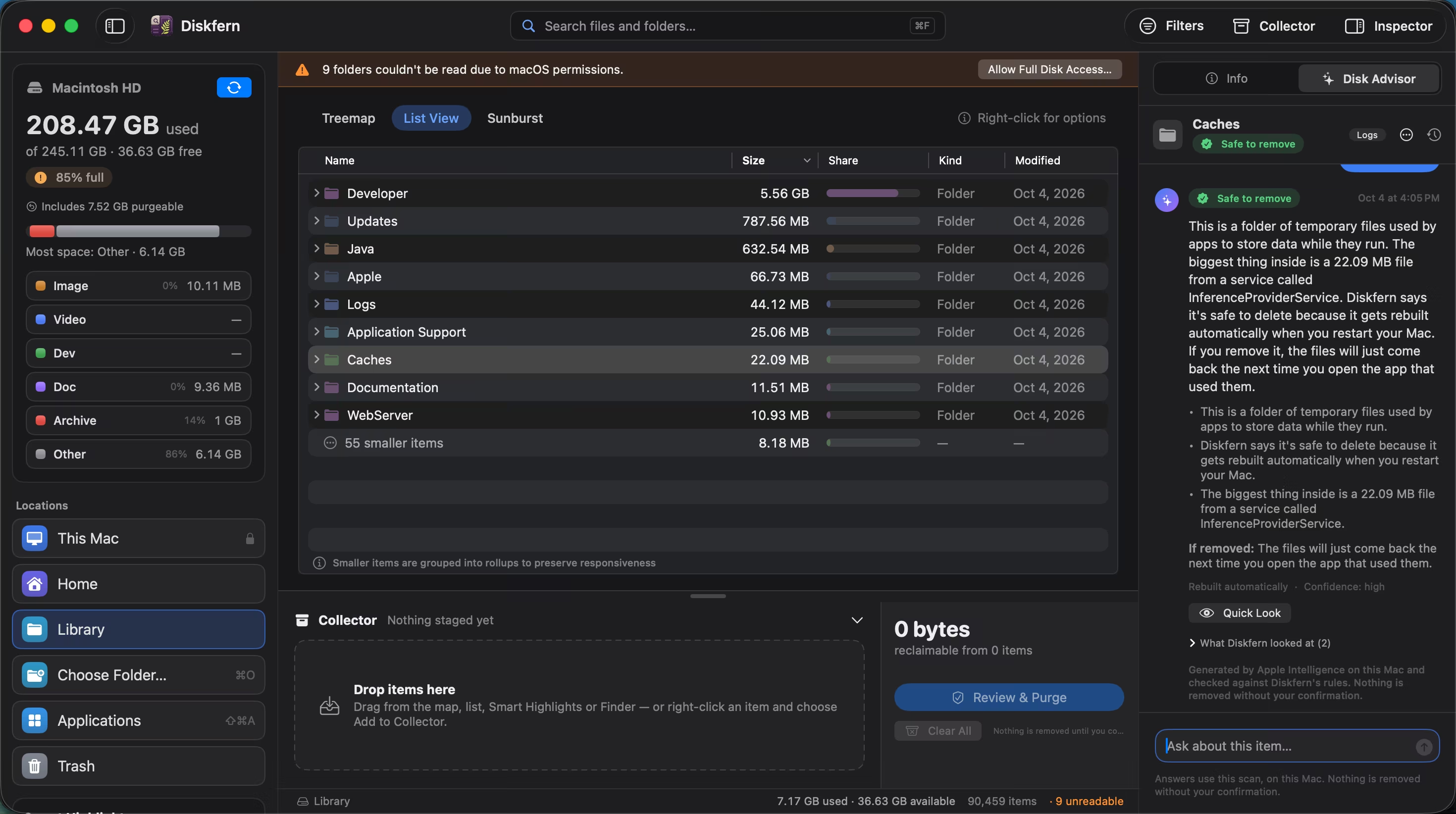
Quick decision guide
| If you want… | Consider |
|---|---|
| Sunburst as your main navigation | DaisyDisk |
| Supported cloud-account scanning | DaisyDisk |
| Three views and named developer categories | Diskfern |
| Trash as the default cleanup destination | Diskfern; review its preferences |
Choose by your workflow; feature details and sources follow below.
At a glance
Compare the workflows that matter to you. On a small screen, scroll the table horizontally.
| Dimension | DaisyDisk | Diskfern |
|---|---|---|
| Best for | Sunburst exploration of local disks and supported cloud accounts. product and license | Folder-level storage exploration with named categories and review before cleanup. storage viewsdeveloper categories |
| Main interface | Sunburst with folder drill-down. product and license | Treemap, sortable list and sunburst, with shared navigation. storage views |
| Large-file discovery | Inspect large segments and navigate to the files behind them. technical specifications | Size filters and largest-item exploration across scanned folders. storage views |
| Search | An indexed filename-search feature: not documented in the vendor sources reviewed. technical specifications | Name search across scan results; folder scope and kind filters. storage views |
| Quick Look / preview | Native Quick Look for files. technical specifications | Native Quick Look, Finder reveal and item details. storage views |
| Cleanup workflow | Stage items in a collector, then delete. Deletion bypasses Trash after a five-second cancellation window. deletion guide | Collector → review → authentication → Trash by default. Explicit permanent deletion is available; preferences can change the default. cleanup workflow |
| Safety and context | Guards selected critical locations; deletion remains a user choice. technical specificationsdeletion guide | Safe / Review / Protected labels and protected-path checks. Rebuildable does not mean cost-free to recreate. developer categoriescleanup workflow |
| Developer storage | Named developer-artifact classification: not documented in the vendor sources reviewed. technical specifications | Named Xcode, Node.js, Android, Docker and model-storage categories; keep project data under review. developer categories |
| App uninstall | A dedicated app uninstaller: not documented in the vendor sources reviewed. technical specifications | Selected app bundles can be removed. Running apps, system apps and Diskfern itself are guarded. Full leftover removal is not established. cleanup workflow |
| Duplicate finder | Content-based duplicate matching: not documented in the vendor sources reviewed. technical specifications | Duplicate matching is not currently available. Choose a tool with documented duplicate matching if that is your main requirement. performance and availability |
| On-device assistant | A storage-focused on-device chat assistant: not documented in the vendor sources reviewed. technical specifications | Diskfern can explain what a file is, why it’s taking space, and whether it’s safe to remove. Your questions and answers stay on your Mac. Requires macOS 26+ and an eligible Mac with Apple Intelligence enabled and its model ready. Core storage analysis works without it. AI answers can be wrong or unavailable. Use them as guidance and review the file before removing it. requirementslocal analysisperformance and availability |
| Privacy / local processing | Vendor documents local metadata scanning without uploading scan data. Optional cloud scanning needs network access. technical specificationsproduct and license | Scanning and Disk Advisor run locally on your Mac. local analysis |
| Broader tools | Cloud scans and purgeable-space exploration extend local disk mapping. product and license | Focused on storage analysis and cleanup. Data recovery and malware scanning are outside its scope. storage views |
| Pricing and trial | USD $9.99 in the US App Store · One-time. The standalone edition has a one-time personal license for up to five personal Macs; minor updates included. The US App Store edition is USD $9.99 with marketplace-specific licensing and no trial. The standalone trial has restrictions. Prices and taxes vary by region. US App Store pricingproduct and licensetrial guide | Free analysis: coming soon. Pro and Family cleanup plans: coming soon. pricing |
| macOS and processors | macOS 10.13+, Intel and Apple silicon. technical specifications | Core: macOS 14+, Intel and Apple silicon. Advisor additionally needs macOS 26+ and eligible, enabled Apple Intelligence. requirements |
Where DaisyDisk makes sense
A focused sunburst workflow
Choose DaisyDisk when circular folder navigation is how you prefer to investigate. It includes Quick Look and staging, so you can inspect candidates before deleting.
technical specificationsdeletion guideA defined personal license
Its one-time personal license covers up to five personal Macs. That's a concrete option for a person with several Macs; business licensing should be checked separately.
product and licenseWhere Diskfern differs
Diskfern combines treemap, list and sunburst views with name search, Quick Look, named categories and safety labels. Its Collector gathers potential removals for review. Trash is the default destination, with an explicit permanent option and a preference override.
Duplicate matching is not currently available. Disk Advisor requires macOS 26+ and eligible, enabled Apple Intelligence; AI guidance can be wrong. Review important files before removing them.
storage viewscleanup workflowrequirementsSee how Diskfern works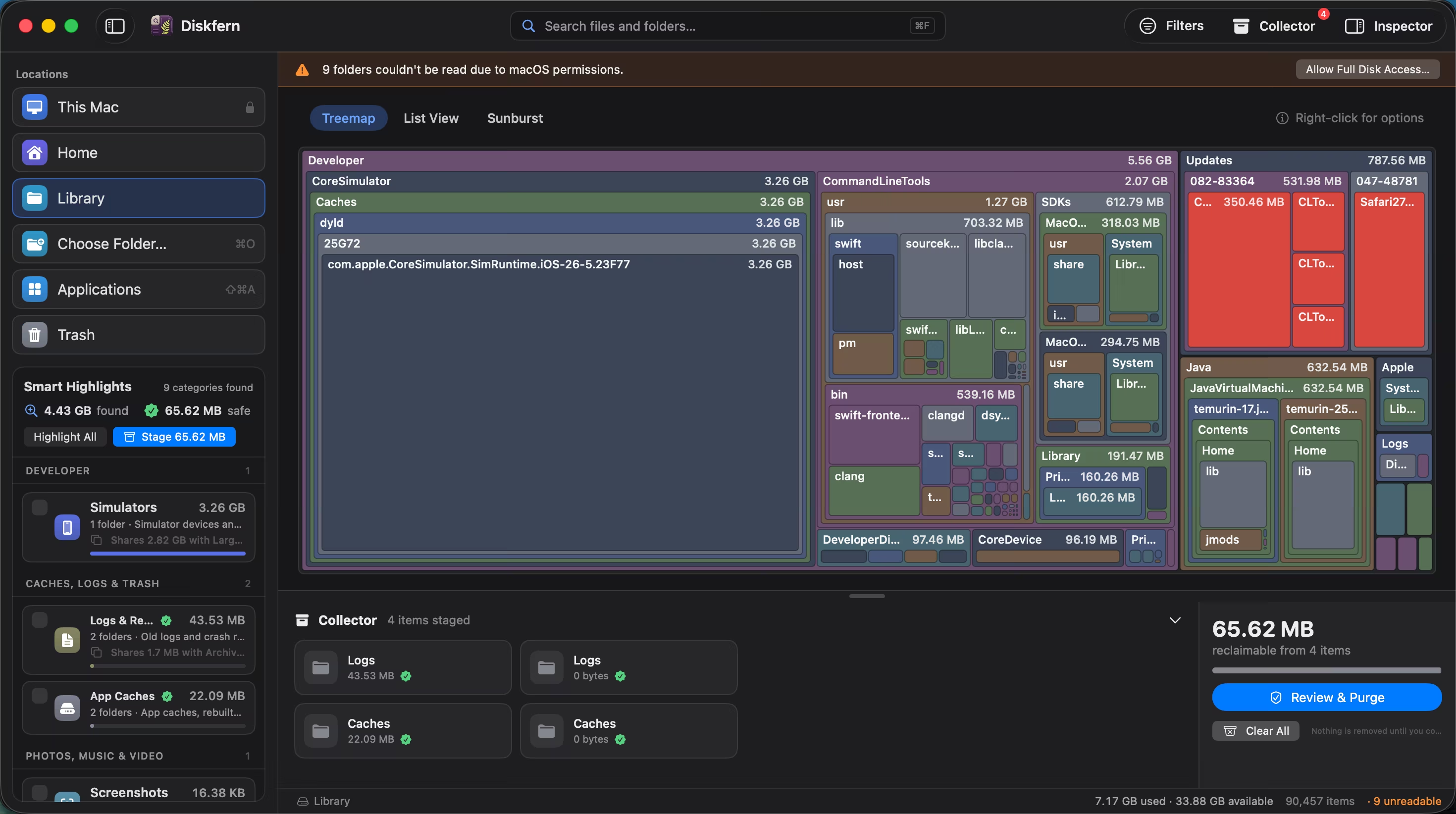
The biggest workflow difference
The destination matters
Both offer a collector. DaisyDisk's documented Delete action erases rather than using Trash. Diskfern defaults to Trash but also offers permanent removal. Decide how you want to recover from a mistaken selection before choosing either action.
deletion guidecleanup workflowThe details that affect your choice
Cloud scans and local scans solve different jobs
If your storage question includes a supported cloud account, DaisyDisk explicitly documents that use. Diskfern scans files on your Mac, including locally stored cloud files.
product and licensestorage viewsLabels versus your own folder knowledge
A developer familiar with their project paths may prefer browsing directly. Diskfern's named categories add explanations, but you still need to check whether an artifact is needed by an active project.
developer categoriestechnical specificationsPricing and licensing
DaisyDisk: USD $9.99 in the US App Store
One-time
The standalone edition has a one-time personal license for up to five personal Macs; minor updates included. The US App Store edition is USD $9.99 with marketplace-specific licensing and no trial. The standalone trial has restrictions. Prices and taxes vary by region.
Verified . Confirm region, tax, device count and upgrade terms before purchasing.
US App Store pricingproduct and licensetrial guideDiskfern pricing
Free analysis: coming soon. Pro and Family cleanup plans: coming soon.
pricingChoose by your needs
Who should choose DaisyDisk?
- You prefer a sunburst and already know which folders deserve investigation.
- You need documented supported-cloud scanning.
- You want a published personal license across up to five Macs.
Who should choose Diskfern?
- You want to switch between a map, exact sizes and folder depth.
- You want named developer categories and a staging area before cleanup.
- You have macOS 14+ and want a focused storage workflow.
Our recommendation
Choose DaisyDisk if you prefer sunburst navigation, need its documented cloud integrations, or want a one-time personal license. Choose Diskfern if three views, named developer categories and a Trash-default review workflow suit how you inspect folders. There is no universal winner; the documented workflow, your Mac and the job you’re doing should decide.
For a practical starting point, read our related storage guide. You can also compare Diskfern’s features and pricing before checking Diskfern availability.
Frequently asked questions
Is Diskfern a DaisyDisk alternative?
For local storage analysis, yes. Their view choices, classification and deletion destinations differ; DaisyDisk also documents cloud scans.
Is DaisyDisk free?
It is paid software. A restricted standalone trial is documented; the App Store edition does not offer that trial.
Does DaisyDisk move files to Trash?
Its documented collector deletion bypasses Trash, after a five-second cancellation window. Back up anything you may need.
Which supports older Macs?
DaisyDisk lists macOS 10.13+, while Diskfern's core requires macOS 14+. Both document Intel and Apple silicon support.
Which is faster?
This review did not run a comparative timing test, so it cannot support a speed ranking.
Does Diskfern always use Trash?
No. Trash is the initial default, but a preference can change it and the review sheet offers permanent deletion. Check the chosen mode.
Sources and evidence
Vendor pages establish documented behavior, not independent performance or safety results. Diskfern links explain product behavior and availability. Each record below states the claim it supports and when it was reviewed.
Browse sources and checked dates
- DaisyDisk product and license
One-time personal license, up to five personal Macs, minor updates; sunburst and optional cloud scans.
Software Ambience · Checked
- DaisyDisk technical specifications
macOS 10.13+, Intel and Apple silicon; Quick Look; system-file safeguards; local scan metadata privacy.
Software Ambience · Checked
- DaisyDisk deletion guide
Collector staging, five-second cancellation, permanent deletion bypassing Trash and protected folder exclusions.
Software Ambience · Checked
- DaisyDisk US App Store pricing
US marketplace edition: USD $9.99. Marketplace licensing differs from the standalone personal license; regional prices and taxes vary.
Software Ambience · Checked
- DaisyDisk trial guide
Standalone trial with locked features and activation; App Store edition does not offer a trial.
Software Ambience · Checked
- Diskfern storage views
Treemap, list and sunburst views, name search, Quick Look and read-only scans.
Diskfern · Checked
- Diskfern developer categories
Named developer-storage categories and safety labels.
Diskfern · Checked
- Diskfern cleanup workflow
Collector review; Trash by default with a preference override; an explicit permanent mode; authentication and protected-path checks.
Diskfern · Checked
- Diskfern performance and availability
Measured scan, classification and search timings. Results vary by system; Disk Advisor response time and availability can vary. Duplicate matching is not currently available.
Diskfern · Checked
- Diskfern requirements
Core analysis requires macOS 14+ on Intel or Apple silicon. Disk Advisor requires macOS 26+ and an eligible Mac with Apple Intelligence available.
Diskfern · Checked
- Diskfern local analysis
Scanning and Disk Advisor run on your Mac.
Diskfern · Checked
- Diskfern pricing
Free analysis and paid cleanup tiers. Diskfern is coming soon.
Diskfern · Checked
About this comparison
Diskfern is not affiliated with, sponsored by, or endorsed by the products or companies mentioned on this page. Product names and trademarks belong to their respective owners.